Resources
Certification
- Help Center
- 5
- Certification
Automated Remote Proctoring Guide
Registering for an SCTE Certification Exam
Preparing your Device: Tech Requirements
Start Your Exam or Confirm a Purchase
Exam Experience – What the UI Looks Like
Additional Resources
FAQs
General
All scheduled SCTE certification exams are displayed in a certification candidate’s SCTE portal profile. Follow the steps outlined on the Certification Resources page to confirm exam registration(s) or start an exam.
Have the certification candidate review the Exam Catalog to select the preferred exam and complete an online purchase following the checkout prompts. Purchases can be completed using a credit card or payment code and will require signing into the SCTE portal account.
For step-by-step instructions reference our support document here.
As of December 2025, certified individuals must opt-in to be added to the Certification Lookup Directory. It’s possible that an individual is SCTE certified, but does not show up in this directory search.
Digital certificates and badges are emailed within one week of passing a certification exam. These digital credentials are hosted on badge.scte.org, allowing certified professionals to easily access and share their accomplishments across social media platforms.
Haven’t received yours? Check your inbox for an email from **[email protected]**.
Confirm your active certification status here and retrieve your digital credentials from badge.scte.org using the email address you used to register for your certification exam.
Need additional assistance? Contact our training services team at [email protected] or 800-542-5040 ext 2.
You can opt in or opt out of being listed on the SCTE Certification Lookup Directory by navigating to the “Notifications Settings” area in your account. For step-by-step instructions, visit the How-To-Guide: Opting In or Out of Notification Settings.
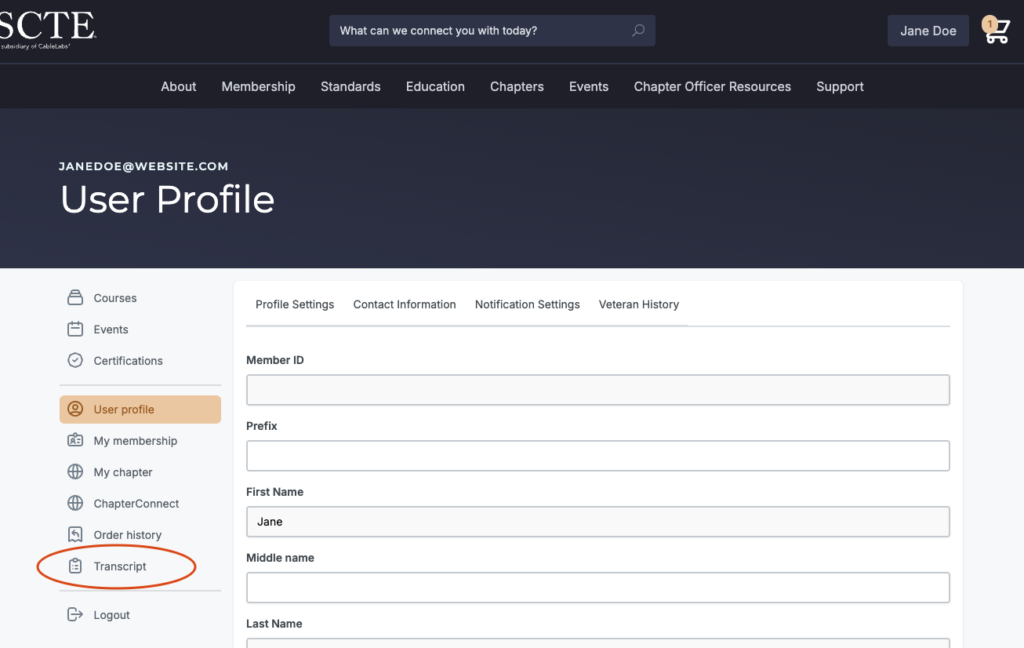
To avoid confusion, SCTE has consolidated to a single transcript that lives in the SCTE portal. To access, log into your account. Once logged in, click “Transcript” on the left menu.
Recertification
Log into your account. Once logged in, click “Transcript” on the left menu.
Confirm you are within the 6 months prior to certification expiration and that you have earned 36 CEH within the three-year certification period.

CEH can be earned at any point during the 3-year certification period. The formal recertification application window opens 6 months before the certification expiration date and closes on the expiration date.
No annual minimum is required. SCTE recommends earning approximately 12 CEH per year as a best practice, but the 36 CEH can be earned at any point in the 36 months following your certification start date.
Expired certifications can be reinstated by retaking and passing the certification exam, per the SCTE Certification Exam Integrity Policy. Lapsed certifications may not be represented as active in the meantime.
Synchronous, live instruction led by an instructor — online, hybrid, or in person — qualifies. Pre-recorded content does not qualify.
Yes, but only SCTE self-paced online courses earn CEH credit, as defined for each course. Third-party self-paced courses do not qualify under the training category.
The guidelines award six CEH per approved conference. Documentation of registration is required.
No. CEH are awarded only for earning a new certification, not for renewals.
Yes, but only 36 CEH are required. Excess CEH do not carry over to the next cycle.
Yes, an activity may be applied to multiple certifications, provided it was completed within the three-year period following certification or the most recent renewal date (i.e., within the certification’s active period).
Only if they are synchronous and instructor-led (live, real-time). Pre-recorded/on-demand webinars do not qualify.
Yes. The full 36 CEH must be earned before submitting the application.
Understanding Automated Remote Proctoring
Automated remote proctoring follows a “record and review” process that records a participant’s webcam video, microphone audio, screen, and web traffic during assessment delivery. Prior to beginning the exam, participants are prompted to hold their identification to the webcam and once the system captures a photo of the ID, the participant is allowed to start the exam.
Video is analyzed to detect a participant’s eye and head movements, identify when multiple faces are present, and detect ambient noise levels to flag potential unauthorized help from others.
Remote proctoring allows certification candidates the flexibility to take exams at any time from any location and does not require a human proctor. The exam platform records a participant’s webcam video, microphone audio, screen, and web traffic using a browser extension that must be installed prior to initiating the exam. All exam participants are prompted to display their government issued identification card to the webcam and once the system captures a photo of the ID, the participant is allowed to commence the exam.
Video is analyzed to detect a participant’s eye and head movements, identify when multiple faces are present, monitor what information is displayed on the screen, and detect ambient noise levels to flag potential unauthorized help from others for SCTE review.
Yes. Automated Remote Proctoring is configured to prompt participants to hold their government or company issued identification to the webcam prior to beginning the assessment. Once the system captures a photo of the ID, the participant is allowed to commence the assessment. The system will flag assessment results in which the scanned ID may be suspicious and warrants human review.
Automated Remote Proctoring uses a “record and review” process that records a participant’s webcam video, microphone audio, screen, and web traffic during assessment delivery.
Exam Content and Format Policies
In the age of generative AI, it’s more important than ever to ensure that certification reflects genuine knowledge and professional readiness. Although the SCTE exams will continue to follow an open-book format, the use of AI is not permitted.
Yes. You may still use a calculator during your certification exam.
Monitoring and Behavior Detection
The system monitors a participant’s keystrokes, browser resizing, copy/pasting, new browser tab or window opening, or the enabling of accessibility mode in attempts to circumvent the software. Video is analyzed to detect a participant’s eye and head movements and identify when multiple faces are present. Ambient noise levels are analyzed to flag potential unauthorized help from others. Ambient noise levels are monitored throughout the exam to detect any changes that fall outside of white noise and warrant review.
No. Although full recordings are available for each assessment session, the system applies a “suspicion level score” derived from an algorithm that considers the behaviors and other data points recorded during the assessment session. Additionally, suspicious behaviors and activities are flagged within each session recording as well as a detailed PDF report, enabling the reviewer to quickly review for possible transgressions.
Recording starts right as you enter the exam, after the diagnostics pre-check and exam agreement have been completed. Recording stops as soon as the test-taker submits or closes the exam.
All exam recordings are stored for a period of 6 months.
Technical Requirements and Browser Support
Participants taking assessments must use either
- Google’s Chrome browser with Proctorio’s Secure Exam Proctor Chrome extension
- Microsoft Edge with Proctorio’s Secure Exam Proctor extension
If the extension isn’t installed beforehand, users will be redirected to add the extension upon opening their certification exam. Installation typically takes about a minute.
The minimum system requirements, defined by Proctorio, can be found here: https://proctorio.com/support/requirements
Privacy and Security of the Proctorio Extension
No. Proctorio will never access your personal files or data stored on your computer.
No, Proctorio does not have access to your browser history.